Assess trees on site. Report to council. Stop typing everything twice.
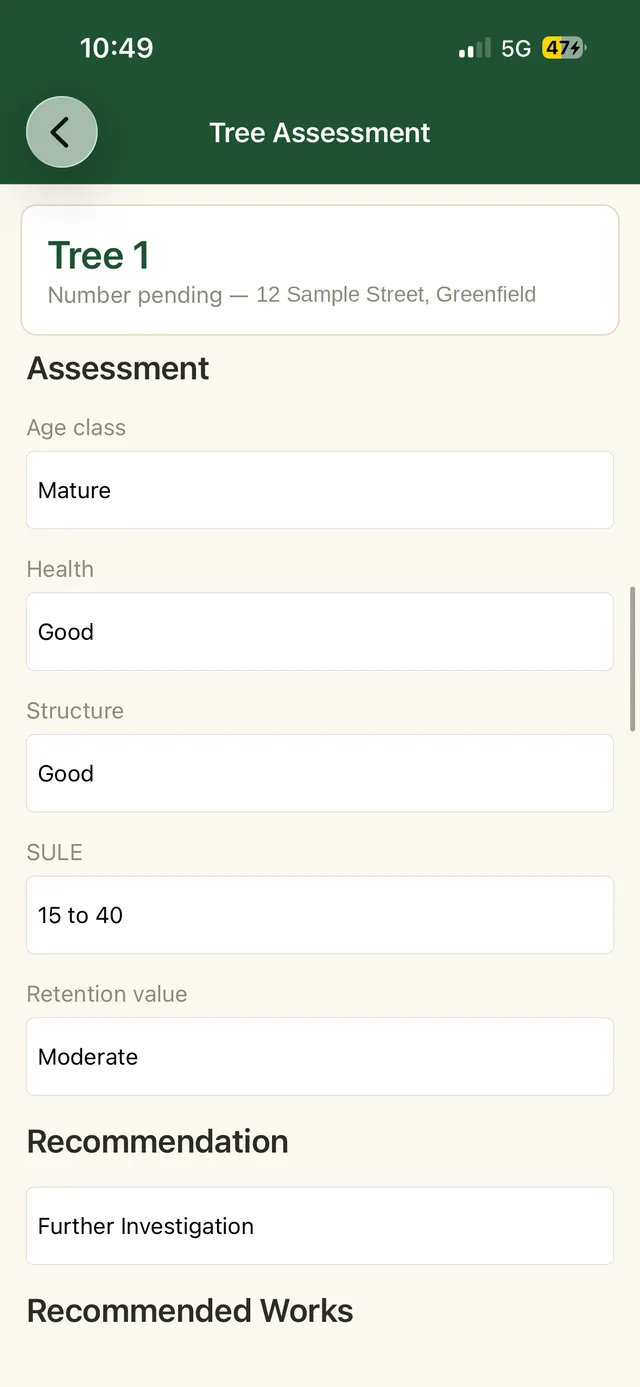
TIMBR Field is the tree assessment app I wanted on the days I was standing under a gum in the rain with a clipboard. Species, dimensions, health, structure and risk go into a proper form as you work. Photos are tagged where you took them. It runs with no signal at all, and everything lands in your own Microsoft 365 tenant ready for the report.
Private beta, capped at ten consultancies, five places left. No credit card, no obligation, and a real person on the other end.
- Built around AS 4970
- Works with no signal
- Your tenant, not ours
Why we built it
Every assessment was getting written twice.
Once under the tree, once at a desk at nine o'clock at night. That was the job for years, and it is the reason this app exists.
I run an arboricultural consultancy. For a long time the field half of our work ran on paper forms and a camera roll, and the office half ran on retyping. Notes got wet. Photos ended up in a phone gallery with nothing linking them to the tree they belonged to. Somebody would ask which of the four eucalypts had the included bark and we would be scrolling back through two hundred images to find out.
We tried the generic capture apps. They are built for plumbers and pest inspectors. None of them knew what a TPZ was, none of them could hold a proper species list, and every one of them wanted to keep our client data on their own servers, which is the first question a council asks and the last answer you want to give.
So we built the thing we actually needed, and then we built the office side to match.
Paper forms and generic apps
- Field notes typed up again at the office, hours gone and mistakes introduced
- Form builders that have never heard of a TPZ, an SRZ or SULE
- Photos stranded in a camera roll with no tree attached to them
- Your client data sitting in a database that belongs to someone else
- One bar of reception and the whole job stops
- Two consultants on the same site recording things two different ways
With TIMBR Field
- You record it once, on site, and the office already has it
- Fields written by an arborist, in the language you already use
- Photos taken in the app, tagged with GPS, attached to the right tree
- Everything syncs into your SharePoint, where your data already lives
- No reception needed. The app holds it and sends it when you are back
- Every consultant on your team records a tree the same way
What it does on site
Everything a site inspection needs, and nothing it does not.
The app walks each tree from arrival to a finished record. A form that speaks arboriculture, AS 4970:2025 figures worked out while you type, photos tagged where you took them, and a queue that keeps working ten metres past the last bar of reception.
A form that speaks arboriculture
Species, dimensions, health, structure, SULE and retention captured in a guided sequence. Every consultant records a tree the same way.
AS 4970:2025 while you type
Reference NRZ and SRZ figures worked out from your measurements, multi stemmed trees combined properly, in the 2025 terminology.
Reception is not your problem
Assess a whole site in flight mode. The queue empties into your SharePoint when you are back in range, and tells you exactly what is still waiting.
Where your data lives
There is no TIMBR database.
Most field apps sync your work into a database they own, and then rent you access to it. We do not do that. Every assessment writes straight into your organisation's own Microsoft 365 and SharePoint, which you already control, already govern and already back up.
Assessments go from the phone into your SharePoint. No middle database, nothing held on our side.
Governed the way you already govern
Permissions, retention, auditing and backup. Every control your organisation puts on SharePoint applies to your tree data automatically.
You cannot be locked in
Your records are SharePoint lists and ordinary files. Stop paying us tomorrow and you lose nothing, because everything is already where it always was.
An easy answer to a hard question
When a council asks where the data lives, you get to say "in our own tenant" instead of naming a vendor they have never heard of.
For councils and records teams
The questions your IT and records people will ask.
If you work in local government, the software is the easy part. Getting it past procurement, records management and information security is the real job.
Where does the data actually sit?
In your tenant, in your SharePoint site, in the region your Microsoft 365 tenant is already provisioned in. If your tenant is in Australia, your tree data is in Australia.
What if TIMBR goes away?
It is a fair question to ask a small vendor and we would rather answer it than dodge it. Every assessment stays in your tenant in readable formats and your team keeps working. That is not a promise, it is how the architecture works.
The rest of the toolkit
Field is where it starts. The suite finishes the job.
Capturing good data on site is only worth something if it turns into a report without being handled three more times. All three pieces read the same records in the same tenant.
TIMBR Field
The phone in your pocket on site. Structured assessments, photos with locations, and a queue that does not care whether you have signal.
What it does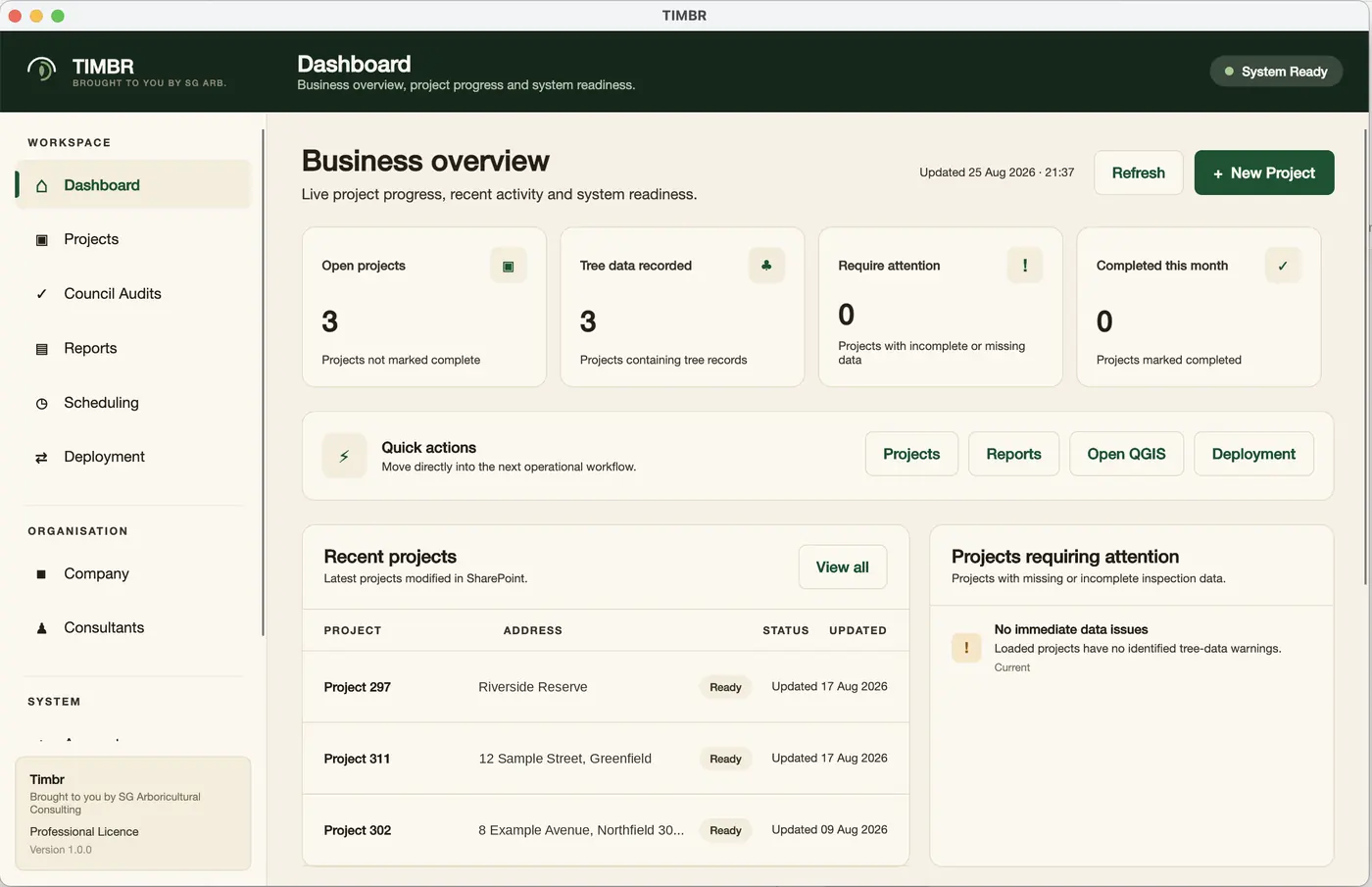
TIMBR Hub
The office side. Manage projects and consultants, schedule site visits, and see which reports are ready to go out.
More about HubTIMBR QGIS plugin
Bring in the development plans, work with your trees spatially, and generate the Arboricultural Impact Assessment from the same data.
More about the pluginWho built this
An arborist wrote it, for his own jobs.
Not a software company that read about trees. The person building TIMBR is out doing assessments with it.

Shaun Gerrard
Consulting Arborist, SG Arboricultural Consulting
- Diploma of Arboriculture, AQF Level 5
- ISA Tree Risk Assessment Qualified (TRAQ)
- Certificate II, Electrical Supply Industry
- Seven years climbing and working in the industry
I have spent the last seven years in this industry, first in the tree, then writing the reports about it. TIMBR came out of the gap between those two jobs.
Climbing teaches you what actually matters about a tree and how quickly you can read one. Consulting teaches you that none of that is worth much unless it survives the trip back to the office in a form somebody else can use. The tools we had were good at one or the other, never both.
It is early, and it is honest about being early. If you use it during the beta and something is wrong or missing, you will be telling the person who wrote it, and it will probably change that week.
Based in Melbourne, working across Victoria. Call 0400 777 395 if it is easier than typing.
Beta consultancies
We would rather show you real ones than invent some.
Nothing here is a real quote yet. We are not going to invent oneThe app is being shaped on live jobs with a small group of consultancies. When they have used it long enough to have an opinion worth printing, their words will be here with their names on them.
This space is held for a beta consultancy's own words on how much time the app takes off an inspection day. We will print it when they have used it long enough to mean it.
Name published at launch
Held for a field arborist on what it is like to work a site with no reception and still finish the job before leaving.
Name published at launch
Held for a council or IT stakeholder on what it meant to keep the tree data inside their own tenant rather than a vendor's.
Name published at launch
Client and council logos go here once we have permission to use them
Straight answers
Questions we get asked
Whether it works with no signal, where your data is stored, how it handles multi stemmed trees, what happens if you stop using it, and what it costs.
Read the FAQPrivate beta
Put it in your crew's hands.
We are capping the beta at ten consultancies, and we have room for five more in the next intake. It stays small because the setup and the walk through are done by the person who writes the code, and there are only so many hours in a week. Tell us a bit about your practice and we will be in touch.
- Setup against your own Microsoft 365 tenant, done with you
- A walk through with an arborist, not a support script
- A direct line to the person building it
- Beta pricing held for twelve months after launch
Would rather talk than type? Call 0400 777 395.